This product was purchased with my own money. The manufacturer had no influence over this review.
- Introduction
- Quick Verdict
- Design and Build
- Setup and Deployment
- Power and Efficiency
- Performance in the Wild
- Portability in Action
- Pricing and Value
- Additional Features
- Pros and Cons
- Best for / Not for
- Conclusion
Introduction
The Anker 737 Power Bank (PowerCore 24K) is a high-capacity portable charger that I’ve been using on hiking and camping trips for reliable off-grid power. This beefy battery pack boasts 24,000 mAh of capacity and up to 140W output, meaning it can charge not just phones and headlamps, but even laptops and devices like Starlink satellite internet in the wild. In this review, I’ll share my hands-on experiences with the 737 in outdoor settings – from keeping my phone alive for days, to occasionally powering a Starlink Mini dish, and even pairing it with a 40W solar panel for recharging at camp. The goal is a practical, trail-tested perspective for hikers and campers considering this power bank.
Quick Verdict
In short, the Anker 737 Power Bank is a powerhouse for off-grid adventures. Its high capacity and laptop-grade output make it ideal for tech-heavy camping, easily handling regular phone charging and even powering a Starlink Mini for a few hours when needed. It feels robust and the smart display is incredibly useful outdoors. The downsides? It’s heavier and pricier than a typical USB power bank, and you’ll need to pack the proper cables (and keep it dry). Verdict: If you require serious portable power in the backcountry and don’t mind the weight, the 737 delivers dependable performance and fast charging that few others can match.
Design and Build
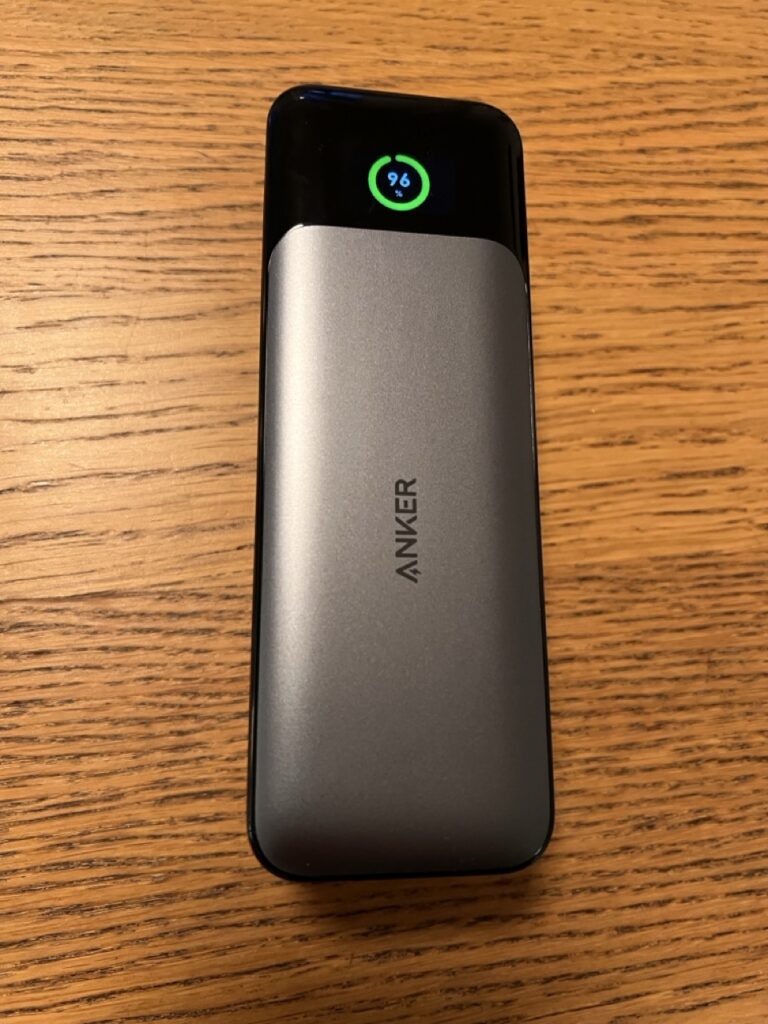
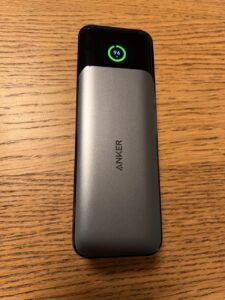
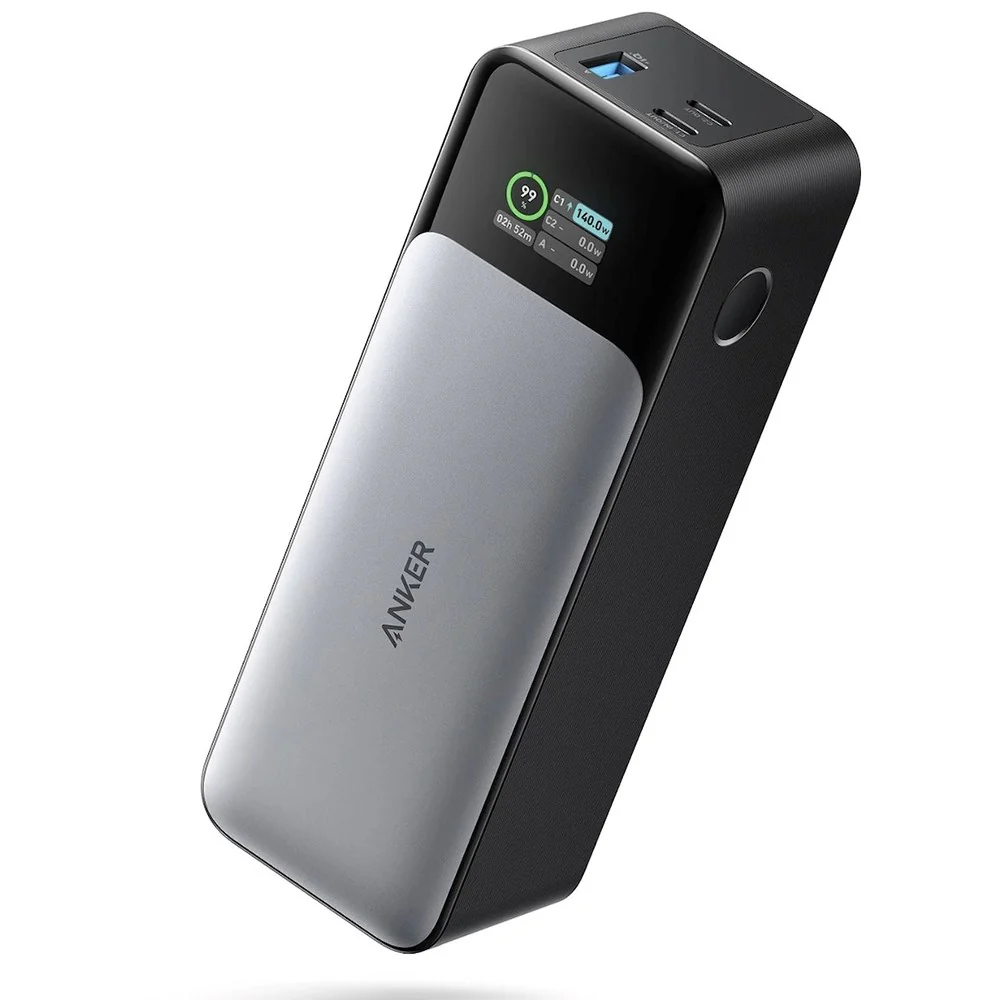
The 737 Power Bank has a sleek but solid build that immediately gives confidence. It’s a rectangular brick (about 6.1 × 2.2 × 2 inches in size) with a black and gray aluminum casing . This metal housing not only feels premium but also helps with heat dissipation during high-power use, which is important when pushing 100W+ in the field . The unit weighs about 630 g (22 oz) – roughly the weight of a full 1L water bottle. In hand it feels like a thick paperback novel or a small brick; not pocket-friendly, but still compact enough to tuck into a backpack pouch.
All the ports and the display are positioned thoughtfully. One end of the device hosts two USB-C ports and one USB-A port along with the power button. The ports are clearly labeled, and the USB-C ports serve both input and output (bi-directional charging). The opposite face features a small OLED screen that shows battery info (more on that later). The overall build quality is excellent – I’ve tossed it in my pack alongside metal gear and it’s taken a few bumps without issue. However, note that the 737 isn’t ruggedized or waterproof (no IP rating), so I take care to keep it dry (I usually stow it in a ziplock or dry sack if rain is expected). The design balances modern tech features with durability, making it suitable for outdoor use as long as you treat it like the high-tech device it is.
Setup and Deployment
Getting the Anker 737 up and running was straightforward. Out of the box, it had some charge, but I topped it off at home using a 65W USB-C PD wall charger before heading out (it reached full in around 2 hours with that charger ). Setup in camp basically involves pressing the power button to wake it, then plugging in your devices. The power bank intelligently negotiates the proper charging rate with each gadget, so there’s no special tweaking needed – it’s plug-and-play. I appreciated that even the first time I used it, the OLED screen immediately showed how many watts my device was drawing, which gave me confidence everything was working correctly.
Deployment in the field can be as simple or advanced as you need. For everyday use like charging phones, you just connect your phone’s cable to one of the ports (USB-C for fast charging or the USB-A for older cables) and the 737 starts charging automatically. If you have multiple devices, you can use all three ports at once – say, charging a phone, a camera, and a headlamp simultaneously. The 737 will distribute power across them intelligently, up to 140W total output shared . I often charged my phone and my friend’s GoPro at the same time with no issues; the device juggles the load well.
Where the 737 really shines for deployment is in more unique setups. For example, I occasionally run a Starlink Mini satellite dish at remote camps. To do this, I use a special USB-C to DC cable that connects the Starlink to the Anker 737’s USB-C port (Starlink’s dish requires ~100W, 20V input). With the proper cable that supports Power Delivery negotiation, the 737’s USB-C port will output the needed 20V/5A to boot the Starlink. The first time I tried, I had an incompatible cable that only drew 5V – lesson learned! Once I switched to the correct PD cable, the Starlink powered up perfectly. It’s literally just connecting the dish to the 737; within moments the dish came alive, drawing about 30–60W as it searched for satellites (visible on the Anker’s screen). In pass-through scenarios, I’ve also had the 737 charging while powering devices – for instance, hooking up my FlexSolar 40W panel to input and charging my phone on output. The Anker 737 does support this simultaneous charge-and-discharge (essentially acting as a mini UPS) . This means during daylight I can top up the power bank from solar, and at the same time keep using my devices. I was impressed that the 737 handled this gracefully: if a cloud passed and input dropped, my phone stayed charging (the 737 seamlessly switched to battery output). There’s no complicated mode to enable for pass-through; it just works, making deployment with a solar panel hassle-free. (One tip: keep the power bank itself in the shade or cover it while charging from solar, as direct sun can heat it up).
Overall, the setup for using the 737 in the wild is hassle-free. It’s basically a matter of carrying the right cables and possibly an adapter for solar. No app or special configuration is needed. Before trips, I make sure to enable the auto-screen-off feature so that the display isn’t on all the time (to conserve power), and I double-press the button to activate the trickle-charge mode when I need to charge low-power devices like my Bluetooth earbuds or LED headlamp. (When trickle mode is on, a little green icon appears and the device will output a tiny current without shutting off , perfect for gadgets that draw very little). All these make the 737 quite user-friendly – even for someone not technically inclined, it’s basically charge it up and plug stuff in.
Power and Efficiency
The raw power of the Anker 737 is its biggest selling point. With 140W Power Delivery 3.1 output, this thing can charge devices as fast as many wall chargers. In practical terms, that means it can fast-charge my phone (e.g., taking an iPhone or Android from 0 to 50% in around 25 minutes) and it can even supply enough juice for my 13-inch laptop or other USB-C notebooks . During one campsite work session, I ran my MacBook Air off the 737 and it delivered a solid ~45W continuously to keep the laptop running and charging simultaneously – very impressive for a battery pack. If you have a power-hungry device, the 737 can likely handle it, as long as it’s USB-powered. It adheres to all the common fast-charge standards (PD 3.1, and compatible with PD 3.0/2.0 devices too), so my friend’s Samsung phone super-charged as quickly off the 737 as it would off a wall plug.
Efficiency is crucial when you’re off-grid, and the 737 is generally efficient but with the typical limitations of high-capacity batteries. Out of the 24,000 mAh it stores, you won’t get all of that delivered to devices due to conversion losses. In my experience (and corroborated by Anker’s support info), expect to deliver roughly 13,000–14,000 mAh of actual charge to your devices from a full battery . In other words, about 60% of the rated capacity is usable after accounting for voltage conversion and heat loss. This is normal for power banks (they convert battery voltage to the 5V/9V/20V outputs, losing some energy). In practical terms, that meant I could charge my smartphone (with ~3,000 mAh battery) about 4 to 5 times fully , which lined up with the manufacturer’s claims of roughly five phone charges per full bank . Likewise, charging an iPad or small laptop that has, say, a 40 Wh battery, I got about 1.2 full charges of it from the 86.4 Wh capacity of the Anker .
One thing I love is how transparent the 737 is about its power flow. The OLED screen displays real-time input or output wattage, as well as an estimated time to full (when charging) or time to empty (when discharging). This is immensely helpful outdoors: for example, when I connected my FlexSolar panel on a sunny day, the screen showed “IN: 18W” and a rising battery percentage, so I knew the panel was working optimally. If a cloud came over, I could see input drop to 5W or 0W and adjust the panel angle or position. Similarly, when charging my phone, I could see “OUT: 9W” (when the phone was nearly full and drawing trickle current) versus “OUT: 18W” (when fast charging earlier). That feedback helped me gauge how efficiently I was using the stored power.
The pass-through charging capability also plays into efficiency for me. During daylight, I might keep the 737 connected to solar while also topping up devices – effectively using it as a go-between energy buffer. This means I’m not wasting any solar energy; any extra goes into the battery, and if a device needs power, it comes from solar first with the battery bridging any gaps. Not all power banks allow this, so it’s a big efficiency win that the 737 does . I will note, Anker doesn’t advertise pass-through heavily (likely because simultaneous charge/discharge can generate heat), so I monitor the unit when doing this. In moderate 20°C (68°F) ambient temps, the 737 got warm but never alarmingly hot while pass-through charging – the aluminum body helps shed heat. I wouldn’t bury it under gear during heavy use though; I keep it in a ventilated spot.
Finally, in terms of charging efficiency: the 737 itself can accept very fast input if you have a capable charger. It supports up to 140W input via USB-C, although I typically use a 60W or 100W charger I carry. At 60W input, I’ve recharged the 737 from near empty to 100% in about 2.5 hours. With a 100W+ PD charger (say from a high-end laptop), it’s even quicker – around 1.5 hours for a full recharge, which is amazing for such a large battery. This fast turn-around is great when you have limited generator or car charger time, or a brief window of sun with a higher-wattage solar panel. (My 40W panel obviously takes much longer – basically a full day of strong sun to approach 80-100% charge). The ability to suck in power quickly means you can regain a lot of runtime in a short period, which is incredibly valuable on the go.
Performance in the Wild
In outdoor environments, the Anker 737 has proven to be a reliable workhorse for me. I’ve taken it on multi-day backpacking treks, car-camping weekends, and even used it during a remote work session in the woods. Battery life in the wild is excellent: for typical backpacking use (charging a smartphone each evening and maybe a camera or GPS device), the 737 easily lasts 4-5 days without needing a recharge. On a recent 3-night trip, I charged my phone to full each night (it uses ~20-25% per day for GPS mapping and photos), topped up a DSLR battery once, and ran a small camp fan for a bit – by the end, the 737 still had around 30% capacity left. Knowing I have roughly 5 phone charges in my pocket gives huge peace of mind when I’m days from any outlet .
Where the 737’s performance really stood out was powering the Starlink Mini. During a camping trip where we needed internet to check some weather maps and send emails, I connected the Starlink dish to the Anker 737. The power bank was able to fully run the Starlink setup, drawing around 30-50 watts continuously, and it lasted about 3 hours of active use before the 24,000 mAh was drained . In practice, that meant we got a solid internet session in the evening to do all our tasks. Three hours might not sound like a lot, but considering the Starlink is a power-hungry device usually run off vehicles or larger power stations, getting a few hours out of a compact battery was impressive. It was enough to check in with family, get updated forecasts, and even stream a short video call from absolutely nowhere – all thanks to the 737. Of course, running something as demanding as Starlink chews through the battery – I watched the percentage on the Anker’s display drop steadily. But it delivered consistent power the whole time; the voltage never sagged and the dish stayed online until the bank was nearly empty. If I wanted longer runtime, I’d consider carrying a second 737 or a larger power station, but for occasional use, it’s perfect.
In general camping use, the power delivery is stable and the device has no quirks that get in the way. Some older power banks would auto-shutoff if the load was very low (making it hard to charge things like headlamps that draw only a tiny current), but the 737’s trickle charge mode solves that – I just double-press to enable it and I can recharge my rechargeable headlamp or wireless earbuds without the power cutting out. I also noticed that when charging multiple devices overnight (like my phone and a friend’s watch), the 737 handled the load intelligently: it might charge one device fully, then the other, or both at reduced speed, but by morning everything was charged. There was an instance where a device (my friend’s older phone) stopped at 80% because of its own “battery protection” feature; the 737 kept supplying a tiny maintenance current so that phone remained topped off – which also meant a slight extra drain on the bank . Now I usually disconnect devices that finish charging to conserve every bit of the power bank for other uses (since the 737 will otherwise keep trickling power, as noted in Anker’s FAQ ).
Environmental conditions: I’ve used the 737 in a range of temperatures. In summer heat (~30°C / 86°F), if it’s in the sun or a hot tent, it will get warm when working hard. I try to keep it in the shade because lithium batteries don’t love heat. The aluminum body can get almost hot to the touch when fast-charging a laptop on a hot day, but I haven’t had it overheat or shut down – it just warms up as expected. In cold conditions (just below freezing, ~ -5°C / 23°F at night), I noticed the output was a bit slower in the morning until the device warmed up. Now I’ll often sleep with the power bank in my sleeping bag or at least wrapped in a jacket on cold nights to preserve its efficiency (this is common practice with any battery in winter). The 737 doesn’t have any official low-temperature cutoff that I’m aware of, but like any Li-ion battery, extreme cold will temporarily reduce its capacity. Once it’s warmed up again, it delivers full power.
I should mention that the 737 has proven quite durable bouncing around in my pack. I don’t baby it, but I do keep it padded between soft items. It’s survived some vibration, minor drops onto grass, and lots of dust exposure. The ports still fit cables snugly and the screen (which is plastic or glass on the front) hasn’t scratched up badly – I see a couple of faint scratches, so now I stick a small screen protector film on it. One thing to be careful of: water. I got a few raindrops on it once during a sudden drizzle and immediately dried it off. There are ventilation slits (for heat) and of course the ports, so I wouldn’t expose it to rain or let it sit in a damp environment. Treat it like you would a camera or phone in that regard.
Overall, the Anker 737’s field performance has been rock-solid. It essentially functions like a mini generator for my camp. Whether it’s keeping phones and GPS units charged over a week-long trek, running a Starlink for emergency comms, or serving as a buffer battery for solar harvesting, it’s handled everything I’ve thrown at it. It has truly expanded what electronics I can use confidently while camping (I’ve even run a small drone off it to recharge batteries between flights). The combination of high capacity and high output in a reasonably compact form makes it a versatile tool for wilderness tech.
Portability in Action
Portability is a bit of a double-edged sword for the Anker 737. On the one hand, it’s impressively compact for the capacity and power it offers. On the other hand, it’s undeniably heavy compared to smaller battery packs. Weighing in at ~630 grams (1.4 lbs), you feel it in your pack. For perspective, carrying this is like carrying an extra large power bank (since, well, it is extra large) – it’s roughly three times the weight of a typical 10,000 mAh phone charger. As a backpacker who counts ounces, I definitely think twice about bringing it on ultra-light trips. I usually reserve the 737 for trips where I know I’ll need the extra juice or when I have multiple people’s devices to keep running (it often becomes the communal charger for the group).
That said, given its capabilities, the weight is justified if you truly need that power. I’ve found ways to make it pack-friendly: its rectangular shape slips nicely into the side pouch of my backpack or into a padded camera cube. It’s about the size of a thick paperback book, so I sometimes carry it in an outer pocket for easy access. I’ve even carried it in a jacket pocket on day hikes (it fits, but you won’t forget it’s there!). For canoe trips or basecamp scenarios, the weight is a non-issue – it’s still far lighter than hauling a full portable power station or multiple smaller banks that add up.
One plus for portability is that the 737 is flight-friendly. With 86.4 Wh of capacity, it’s under the TSA/airline limit of 100 Wh, so I’ve taken it on planes in my carry-on without trouble . This is great for traveling to a hike – I can charge it up at home, fly with it, and have it ready to go upon landing for a trek. (Airlines generally require batteries to be in carry-on, not checked luggage, which applies to the 737 as well.) So while it’s heavy in a backpacking sense, it’s portable in the broader sense that it’s still a handheld device you can travel with anywhere.
For everyday carry or short trips, the 737 is probably overkill – I’d opt for a smaller 10k or 20k mAh pack in those cases. But for portability on extended expeditions, having one 24k mAh brick is often more convenient than juggling multiple smaller batteries. I like that I can charge or use one thing after another without swapping power sources. It simplifies my kit: one device to charge, one device to check battery level on, one device to worry about recharging via solar, etc.
In summary, portability in the hiking context comes down to your priorities. If you’re a hiker who carries camera gear, satellite communicators, or needs to work remotely in the field, the weight of the 737 is a worthy trade-off for the all-in-one power solution it provides. If you’re a casual weekend camper who just needs to charge a phone twice, you might prefer a lighter option. Personally, I’ve found that when I do bring the Anker 737, I never regret having the extra power – but I do notice the extra weight. It’s a conscious decision: I’ll pack one less water bottle or a lighter tent if it means I can bring this power bank and ensure my electronics don’t die when I need them.
Pricing and Value
The Anker 737 Power Bank sits at the premium end of the power bank market, and its price reflects that. At the time of writing, it’s listed around $150–$200 USD retail (I purchased mine for about $130 on sale) . This is considerably more expensive than basic 20,000 mAh power banks, which can be under $50, and even pricier than some competing high-output banks. For example, there are lesser-known brands offering 100W, 20,000 mAh packs in the ~$80 range . So you are paying a premium for Anker’s build quality, brand reputation, and the 737’s top-tier specs.
Is it worth it? In my view, if you truly need what the 737 offers, then yes – the value is there. No generic power bank I’ve tried has matched the 737’s combination of capacity, output, and feature set (that OLED screen and reliable performance). On expeditions or remote work trips, the cost of power failing can be high (missed communications, lost photo opportunities, etc.), so I invest in reliable gear. The 737 has so far proven its worth by being dependable under conditions where I wouldn’t trust a cheap no-name battery. Anker also provides good customer support and an 18-month warranty (extendable to 24 months upon registration) , which adds peace of mind for a pricey item that will see rough use.
For someone who only occasionally camps or doesn’t push their electronics, the 737 might be overkill in both power and cost. Such a person could save money with a smaller capacity bank. However, for power users – say a backpacker carrying a drone, mirrorless camera, smartphone, and maybe a tablet – buying one 737 could actually be more cost-effective than buying multiple smaller banks to equal the capacity/output. I also considered the “modular” approach: I could carry two 10,000 mAh banks (one in use, one charging on solar), which might be cheaper. But the 737 ends up more convenient and actually not far off in total price (two decent 10k power banks could be $80 total anyway).
It’s also worth noting that the Anker 737 often goes on sale. I’ve seen it drop near $100 during holiday sales or on Woot (which was a steal for what it offers) . So the value can improve if you snag it at the right time. Anker’s products hold up well, and because this model is at the top end of specs (140W PD 3.1), it’s somewhat future-proof – it can handle next-gen devices and higher power draw than many current gadgets even need. That means it’s a bit of an investment, but one that will remain useful for years. I expect to still be using this power bank beyond just 2025, especially as it’s rated for at least 500 full charge cycles before dropping to 80% capacity (that’s a typical few years of heavy use).
In terms of value added, I’ll highlight that the 737 comes with a high-quality USB-C cable in the box (useful for achieving that 140W if you have a compatible charger) and Anker’s customer service is responsive. I had a minor question about pass-through charging early on, and their support clarified it quickly. Knowing I have that backing makes the higher price easier to swallow.
To sum up, the Anker 737 is an expensive but high-value item for those who need robust off-grid power. If your usage scenario justifies it – long trips, critical devices, demanding power needs – then it’s worth every penny. If not, you might opt for a cheaper solution. In my case, using it regularly for camping and even as a backup power source at home (during brief outages, it doubles as a UPS for my router), I feel I’ve gotten great value out of it.
Additional Features
Beyond the headline specs, the 737 Power Bank has a few extra features and design touches that enhance its usability for outdoor enthusiasts:
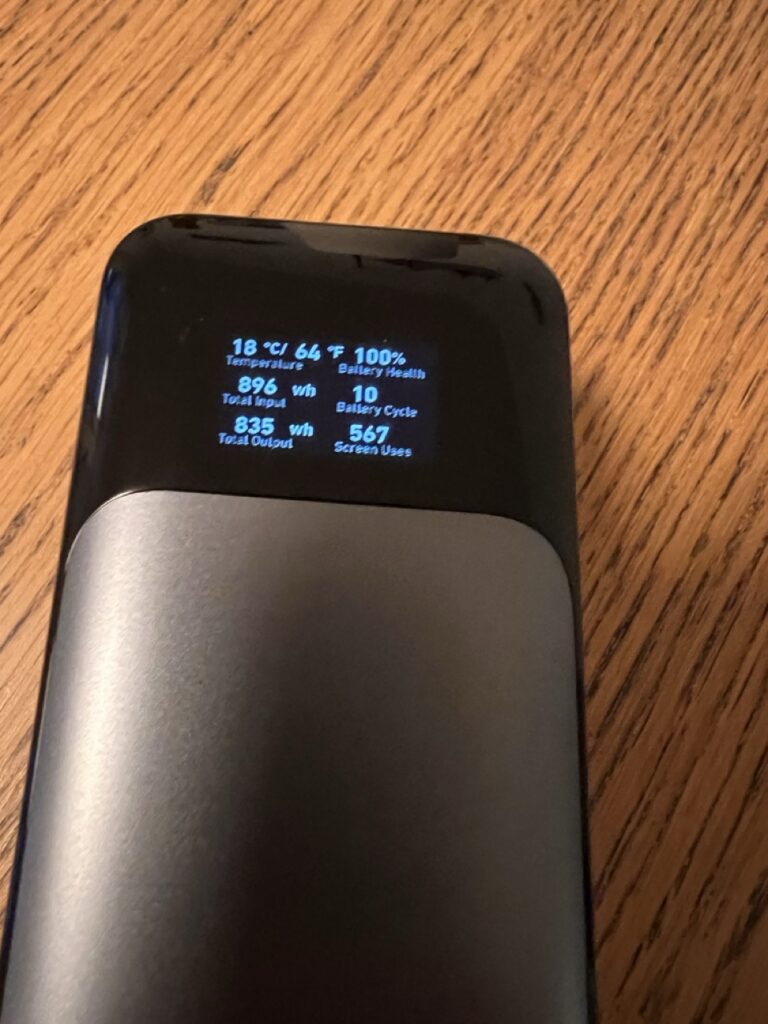
- Smart Digital Display: The OLED screen is one of my favorite features. It doesn’t just show a battery bar; it gives % remaining, and when charging or discharging it shows real-time wattage and an estimated time to full/empty . For example, if I plug it into a wall charger, it might say “IN: 60W – 1.5h to full,” which is super useful when planning my downtime in camp. Similarly, when running my Starlink or charging multiple devices, I can see how many watts are going out and an estimate of how long the battery will last at that rate. This level of insight is rare in power banks and perfect for geeky optimization of solar positioning or rationing power among devices. The display can also cycle through additional info like battery health, number of charge cycles, total input/output used (lifetime) – kind of like an odometer for the battery. It’s a neat touch to check how hard your battery’s been working.
- Intelligent Power Distribution: Internally, the Anker 737 has smart circuitry (Anker’s PowerIQ 4.0 and other tech) to manage charging efficiently . In practice, this means if you plug in multiple devices, it allocates power to each device’s needs. I’ve observed that if I plug in my laptop and phone together, the laptop gets priority high wattage, and the phone might charge a bit slower until the laptop draws less. It can recognize over 1000 compatible devices and apply the best protocol for each . The benefit is you don’t have to babysit it – just plug everything in and it sorts out the best way to charge them all safely.
- Low-Current “Trickle” Mode: For charging tiny gadgets (like smartwatches, earbuds, headlamps), the 737 offers a trickle charge mode. Activated by double-pressing the power button (a little green LED dot appears on the screen), this mode ensures the power bank will deliver a steady low current and not auto-shutoff due to low draw . I’ve used this to charge my Petzl rechargeable headlamp, which only needs a few hundred milliamps – without trickle mode some big batteries would turn off, but the 737 handles it perfectly. It’s a small feature, but critical if you carry a variety of gear including low-power devices.
- Pass-Through Charging (UPS functionality): Though I mentioned this earlier, it’s worth calling out as a feature. The 737 can effectively act as an Uninterruptible Power Supply for devices during brief outages or source changes . For instance, I’ve used it at home to keep my Wi-Fi router running during a power outage – with the router plugged into the 737 and the 737 plugged into the wall, when the power went out the router didn’t even flicker off; the battery seamlessly took over. In the field, this translates to the solar panel scenario I described or any time you want to charge the battery while it’s charging something else. Not every power bank can do this well (some reset or cut power), so it’s a notable plus for the Anker.
- Multiple Safety Features: Anker builds in a host of safety measures – the 737 has over-voltage, over-current, overheat protection, etc. I take comfort in this because I often leave it charging unattended (like in the sun or overnight in a safe spot). It’s also designed to prevent overcharging devices and itself. According to Anker, there’s an 11-point safety system including temperature control and monitoring of each cell . In use, I’ve never experienced any glitch or dangerous behavior; it has been very stable. The only “safety” behavior I noticed is if it’s extremely hot, I think it throttled the charging speed a bit to keep temps in check – which is exactly what you’d want it to do.
- Battery Longevity Tech: The 737 is advertised to have a long lifespan battery. After roughly 500 full charge cycles, it should still retain about 80% capacity , thanks to the quality of the cells and Anker’s charging management. This is double what some cheaper batteries manage before significant degradation. I haven’t had it long enough to verify that, but so far I’ve done maybe ~50 cycles and it still shows 100% health on the display. For someone who will use this frequently, the extended battery health is a great feature – it means the 737 can serve for many seasons of camping.
- Air Travel and International Use: As mentioned, it’s under the flight limit for batteries, which is an often overlooked feature if you travel internationally for treks. Also, because it uses USB-PD, you can recharge it anywhere in the world with the appropriate plug adapter – no special converter needed aside from your USB-C wall charger. I once charged it in a remote village homestay using a solar generator as the source, and another time from a 12V car socket inverter. It’s versatile in how you can keep it juiced up.
- Warranty and Support: While not a feature of the device itself, the package includes an 18-month warranty (and they’ll extend to 24 months if you register online) . Anker also has responsive customer support. Knowing this is important for an expensive item; if it fails on me, I trust that Anker would likely replace it hassle-free within the warranty period. That assurance is worth noting, especially if you plan expeditions – you want gear that the company stands behind.
One thing notably absent in terms of features is any form of lighting (some power banks include a flashlight). The 737 has no flashlight, which honestly is fine since I carry dedicated lights. Also, it doesn’t have wireless charging – again not expected in this kind of device but worth mentioning if someone was looking for that. It’s focused on being a charging beast with smart tech, and it fulfills that role without gimmicks.
Pros and Cons
Pros:
- Massive Capacity & High Output: 24,000 mAh capacity (86.4 Wh) provides ~4–5 phone recharges or even a full laptop charge . The 140W PD output can fast-charge laptops, drones, and other heavy-draw devices that ordinary power banks can’t handle.
- Excellent for Off-Grid Use: Can even run a Starlink Mini satellite dish (~100W draw) for a few hours . Great for hikers/campers who need to power routers, cameras, fans, etc., off-grid.
- Fast Recharge & Passthrough: Supports extremely fast recharging (up to 140W input), so you can refill it in ~1-2 hours with a powerful charger . Also allows pass-through charging, meaning it can charge devices while being charged itself – ideal for solar panel setups or UPS usage.
- Informative OLED Display: The screen provides real-time data (input/output watts, time to charge, battery %), making power management easy . You always know how much juice is left and how devices are charging.
- Robust Build Quality: Premium aluminum shell that dissipates heat well . Feels durable and solid; built to handle extended use. The design is compact for the capacity and fits well in a pack.
- Multi-Device & Smart Charging: Three ports (2× USB-C, 1× USB-A) let you charge up to three devices at once . Smart power distribution and support for all common fast-charge protocols ensure efficient charging for each device without babysitting.
- Trickle Charge Mode: Has a dedicated low-power mode for charging small devices like headlamps, earbuds, GPS watches, etc., without auto-shutoff (activated by double-pressing the power button) .
- Airplane Friendly: Under 100Wh limit so it’s travel-ready for flights . Convenient for international treks – you can bring this in carry-on no problem.
Cons:
- Heavy for Backpacking: At ~630 g (22 oz) , it adds significant weight. Ultralight hikers may find it too heavy unless the high capacity is absolutely needed.
- Premium Price: More expensive than many similar-capacity banks. You pay a premium for the 140W output and Anker brand. Budget alternatives exist (albeit with compromises) at a lower cost .
- Not Weatherproof: No water or dust resistance rating. Must be kept dry and protected in outdoor environments – a rainstorm or drop in a puddle could ruin it. Requires a bit of care/cover in bad weather.
- Bulkier than Standard Power Banks: Although compact for its capacity, it’s still chunky compared to a 10,000 mAh bank. Takes up space in your pack (similar footprint to a large portable hard drive, but thicker).
- No Built-in Solar/Hand Crank: (Minor) It doesn’t have any integrated solar panel or alternative charging method – you’ll need an external power source to recharge it off-grid (like a separate solar panel, which adds to your kit).
- Requires PD Charger for Max Benefit: To fully utilize the fast recharge, you need a powerful USB-C PD charger (not included). Using a regular phone charger (~10-20W) will recharge this very slowly given its size.
- No AC Output: (For those who care) It cannot output AC power. If you need to plug in AC appliances, you’d need a different solution (a power station). The 737 is DC-only via USB, which is fine for electronics but not for things like AC lights or older chargers.
- Idle Drain if Settings Not Managed: If you leave the display on constantly or cables connected with trickle mode, the battery can drain about 15% per day just from idle power use . It’s easy to avoid by using auto-off and unplugging when not needed, but something to be aware of.
Best for / Not for
Best For:
- Hikers & Campers with High Power Needs: Ideal for multi-day backpacking trips, overlanding, or camping where you need to charge multiple devices (smartphones, tablets, cameras, drones, GPS units) multiple times. Especially suited for tech-focused adventurers or digital nomads camping remotely.
- Off-Grid Work and Connectivity: Great for remote workers, storm chasers, or anyone needing to run a Starlink Mini or similar satellite/communication device off-grid. The 737 can power a Starlink for ~3 hours , enabling internet in the backcountry.
- Solar Charging Setups: If you plan to use a solar panel (like the FlexSolar 40W) to recharge in the field, the 737 acts as an efficient storage bank with passthrough capability. It can soak up 18W of solar input while simultaneously charging your devices during the day , essentially functioning as the heart of a small solar generator system.
- Professionals on Expeditions: Photographers, film-makers, researchers, or guides who rely on laptops or high-end equipment in remote areas will benefit from the high output (140W can even top up drone batteries or run a MacBook). It’s also a solid backup for CPAP users camping off-grid (for short nights or emergencies, given the UPS-like function).
- Travelers and Preparedness: Frequent travelers who want a reliable, flight-safe power bank for long flights or layovers, and emergency preppers who want a strong battery for power outages (the 737 can keep critical devices like medical equipment or phones running in a pinch) .
Not For:
- Ultralight Backpackers: If every gram matters and your power needs are minimal (just a phone and maybe a headlamp for a weekend), this power bank is overkill. There are much lighter options in the 5,000–10,000 mAh range that make more sense when weight is a top priority.
- Casual Campers with Low Power Usage: For a simple overnight camping where you might only charge a phone once, the 737’s capacity isn’t needed. You could save money and weight with a smaller power bank. The 737 really shines on longer trips or with multiple gadgets.
- Budget-Conscious Users: If you don’t need the advanced features or extreme output, you might find the price hard to justify. Cheaper power banks can suffice for basic needs (charging phones or Bluetooth speakers), so the 737 is not aimed at the casual user who just wants an inexpensive backup battery.
- Primarily AC Power Needs: Those looking to power AC devices (like standard household plugs – e.g. a CPAP machine, AC laptop charger, etc.) should look at a different class of device (portable power stations). The 737 is fantastic for USB-PD devices, but it won’t directly run AC appliances since it has no inverter.
- Wet or Rough Environments without Protection: If you’re going into an environment where your gear will definitely get soaked or caked in mud (think canyoning, or expeditions in heavy rain forests) and you can’t guarantee it’ll stay dry, the 737 might not be the best choice unless you use a robust protective case. It’s not built to be a rugged, waterproof battery – there are other products with weatherproofing for those extreme conditions.
Conclusion
The Anker 737 Power Bank has become an essential part of my outdoor gear kit when I expect to be away from power for extended periods. It’s not a trivial gadget – it’s a serious piece of equipment for serious needs, and it performed up to expectations in my real-world tests. From keeping my smartphone and camera charged through a week in the mountains, to the more extraordinary feat of powering a Starlink Mini in the middle of nowhere, the 737 has proven its versatility and reliability. The combination of high capacity, ultra-fast output/input, and smart features like the OLED display and pass-through charging make it stand out in a crowded market.
That said, it’s important to match the tool to the job. This power bank is fantastic for scenarios where you have multiple devices or high-power devices and you absolutely need them running off-grid. If you’re an avid hiker or camper who finds yourself wishing you had just a bit more power or faster charging in the wild, the 737 could be a game-changer. On the other hand, if your outdoor tech needs are modest, you might never fully tap into what this battery offers (and you’ll be carrying extra weight for nothing). In my case, as someone who often navigates with a phone, documents trips with a camera and drone, and occasionally needs internet access or laptop use off-grid, the Anker 737 has been worth every ounce and every dollar.
I appreciate its thoughtful design – the durability, the feedback from the display, the ease of use – which all matter when I’m tired at camp and just want things to work. It essentially brings the convenience of home charging to the wilderness. Sure, I’ve had to adjust to its heft in my pack, and I remain cautious about weather exposure, but those are small trade-offs. After many uses, the 737 has held up well, and I expect it will continue to be my go-to power reserve on adventures for years to come (or until Anker outdoes itself with an even more advanced model). In summary, the Anker 737 Power Bank is a trusted companion for the trail – powerful, dependable, and ready for just about anything you need to plug in when you’re far from civilization. For the right user, it’s more than a gadget; it’s a little lifeline of energy that can keep your journey powered and your mind at ease.